PA5 - Convolution
Credit: Wikipedia
Objective
The lab’s objective is to implement a tiled image convolution with some optimization.
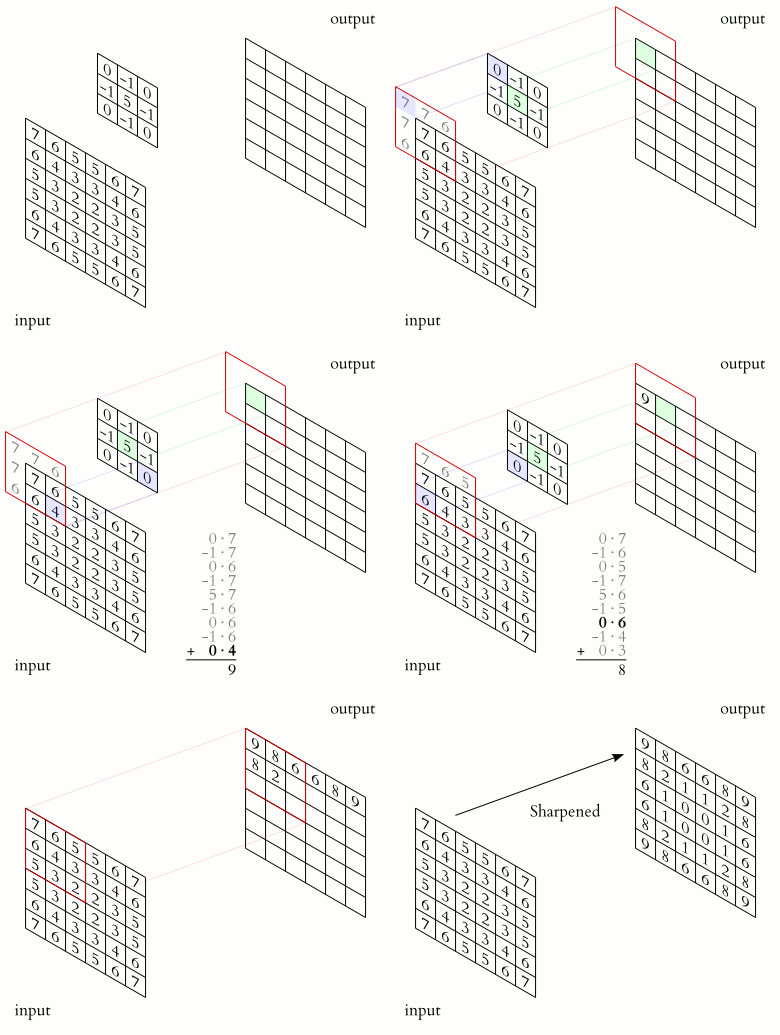
Convolution is used in many fields, such as image processing for image filtering. A standard image convolution formula for a 5x5 convolution filter M with an Image I is:
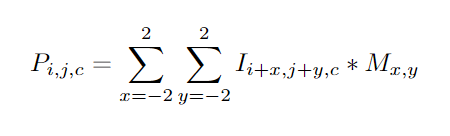
where  is the output pixel at position
 i,j in channel c,  is the input pixel at
 i,j in channel c (the number of channels will always be 3 for this PA corresponding to the RGB values), and  is the mask at position
 x,y.
Note that for this PA, you should preform VALID padding. This means that you should not include any output elements of which the computation will access index that is out of bounds for the input matrix. i.e. for the equation above, i+x and j+y should not exceed the dimension of the original image. For more information, you can checkout this video: https://www.youtube.com/watch?v=ph4LrdntONo
Input Data
The input is an interleaved image of height x width x channels. By interleaved, we mean that the the element I[y][x] contains three values representing the RGB channels. This means that to index a particular element’s value, you will have to do something like:
index = (yIndex*width + xIndex)*channels + channelIndex;
For this assignment, the channel index is 0 for R, 1 for G, and 2 for B. So, to access the G value of I[y][x], you should use the linearized expression I[(yIndex*width+xIndex)*channels + 1].
For simplicity, you can assume that channels is always set to 3.
Instructions
Edit the code in the code tab to perform the following:
Allocate device memory
Copy host memory to device
Initialize work group dimensions
Invoke OpenCL kernel
Copy results from device to host
Deallocate device memory
Implement the convolution kernel with adjustments for channels
Instructions about where to place each part of the code is demarcated by the //@@ comment lines.
Psuedo Code
A sequential pseudo code for convolution with SAME padding on the original image would look something like this (you should preform VALID padding instead of SAME padding for this PA):
maskWidth := 5
maskRadius := maskWidth/2 # this is integer division, so the result is 2

for i from 0 to height do
    for j from 0 to width do
        for k from 0 to channels
            accum := 0
            for y from -maskRadius to maskRadius do
                for x from -maskRadius to maskRadius do
                    xOffset := j + x
                    yOffset := i + y
                    if xOffset >= 0 and xOffset < width &&
                        yOffset >= 0 and yOffset < height then
                        imagePixel := I[(yOffset * width + xOffset) * channels + k]
                        maskValue := K[(y + maskRadius) * maskWidth + (x + maskRadius)]
                        accum := accum + imagePixel * maskValue
                    end
                end
            end
            P[(i * width + j) * channels + k] := accum
        end
    end
end
How to Compile
The main.c and kernel.cl file contains the code for the programming assignment. There is a Makefile included which compiles it. It can be run by typing make from the PA5 folder. It generates a solution output file. During development, make sure to run the make clean command before running make.
How to Test
Use the make run command to test your program. There are a total of 15 tests on which your program will be evaluated for (functional) correctness.
Timing for CPU and GPU
If you want to see time using the GPU make time
If you want to see time using the CPU PLATFORM_INDEX=1 DEVICE_INDEX=0 make time
Dataset Generation (Optional)
The dataset required to test the program is already generated. If you are interested in how the dataset is generated please refer to the dataset_generator.py file. You may run this file to generate random datasets for testing.
To generate dataset with stride python dataset_generator.py --with_strides
To generate dataset without stride:code:` python dataset_generator.py`
Strides (Optional)
The matrix convvolution we have discussed so far has a default stride number of 1. For convolution with stride denoted s, you should discard any pixel not at position s*i or s*j in the convoluted image with stride 1. For the optional extra credit task, you should preform convolution given the variable stride in main.c.
We have provided you an additional make with_stride for stridded convolution. You can test your execution time locally by running make time.
Similarly if you want to time code with stride:code:make time_with_stride
Submission
Submit the main.c and kernel.cl file on gradescope. Preserve the file name before uploading to gradescope.
Grading
You will be graded on correctness (95pts) and on your time on a 1080ti. Times subtract from your correctness.





These times will be on the leaderboard
Optional
Like last PA, we have a optional section on the PA for bragging rights. A major point behind using OpenCL is applying the same kernel to many devices. So also on the leaderboard are three other devices (a CPU, a Google Pixel Fold’s GPU, and a Thundercomm Rubik Pi’s GPU):
Platform |
Device |
|---|---|
Intel® OpenCL |
Intel® Xeon® Platinum 8275CL |
Portable Computing Language |
NVIDIA GeForce GTX 1080 Ti |
Google Tensor |
Mali-G710 r0p0 |
Qualcomm Dragonwing™ |
Qualcomm Adreno™ 643 |
Good implementations may optimize for one device, great implementations will optimize for many devices that you are targeting for.